
Your journey, drawn clearly — every step, every why.
Every appliance explained in COE's own voice — braces, aligners, expanders, retainers, and more.
Late-night questions become understanding. Most concerns can comfortably wait for office hours — we show you how.
A gentle financial guide that keeps your plan clear and simple.
 Built by Vision Optimized · Want technology like this for your practice?
Let's set up the journey
A few details draw the timeline. Your COE documents can fine-tune this anytime.
Have your COE treatment plan or financial plan handy? Add a photo or a file and the app reads it and fills in the details below — appliances, estimated months, and the figures for your estimate. Add one or both. You choose whether each document is kept in My Documents or deleted once it's read. Insurance papers and bank details are never read.
Prefer to type? Fill in the details below by hand — every field is yours to change anytime.
Yours, or your child's — one account can hold the whole family, each smile with its own timeline.
Your timeline is drawn to the last month of this range — so every early finish feels like the gift it is.
A co-parent, spouse, partner, or caregiver can share a journey with you. Enter the sharing code they gave you and it appears here — already set up, nothing to re-type.
Timeline
Added time never adds cost. COE welcomes every extra visit — our only incentive is your fastest, healthiest smile.
Add the treatment paper from our office. A photo lets the app read the plan and tailor your journey. You're in control: keep the photo in My Documents, or have the app read it once and not save it — and anything on your shelf can be removed anytime.
When you and your COE team agree on a new plan — a second phase, a re-treatment, or a new goal — it gets its own timeline and its own investment, separate from this one. Everything here stays safe.
The story so far
My Next Visit
Save your visit here, then add it to your calendar with one tap — reminder included.
Your calendar app takes it from there — Apple, Google, and Outlook all welcome the invite, complete with a reminder the day before. 💙
Log my habits
Logging keeps your timeline truthful — and truth is the fastest path to the smile you'll love.
Sometimes our team strategically waits to rebond — that patience protects your result, and the timeline breathes with it.
Learn
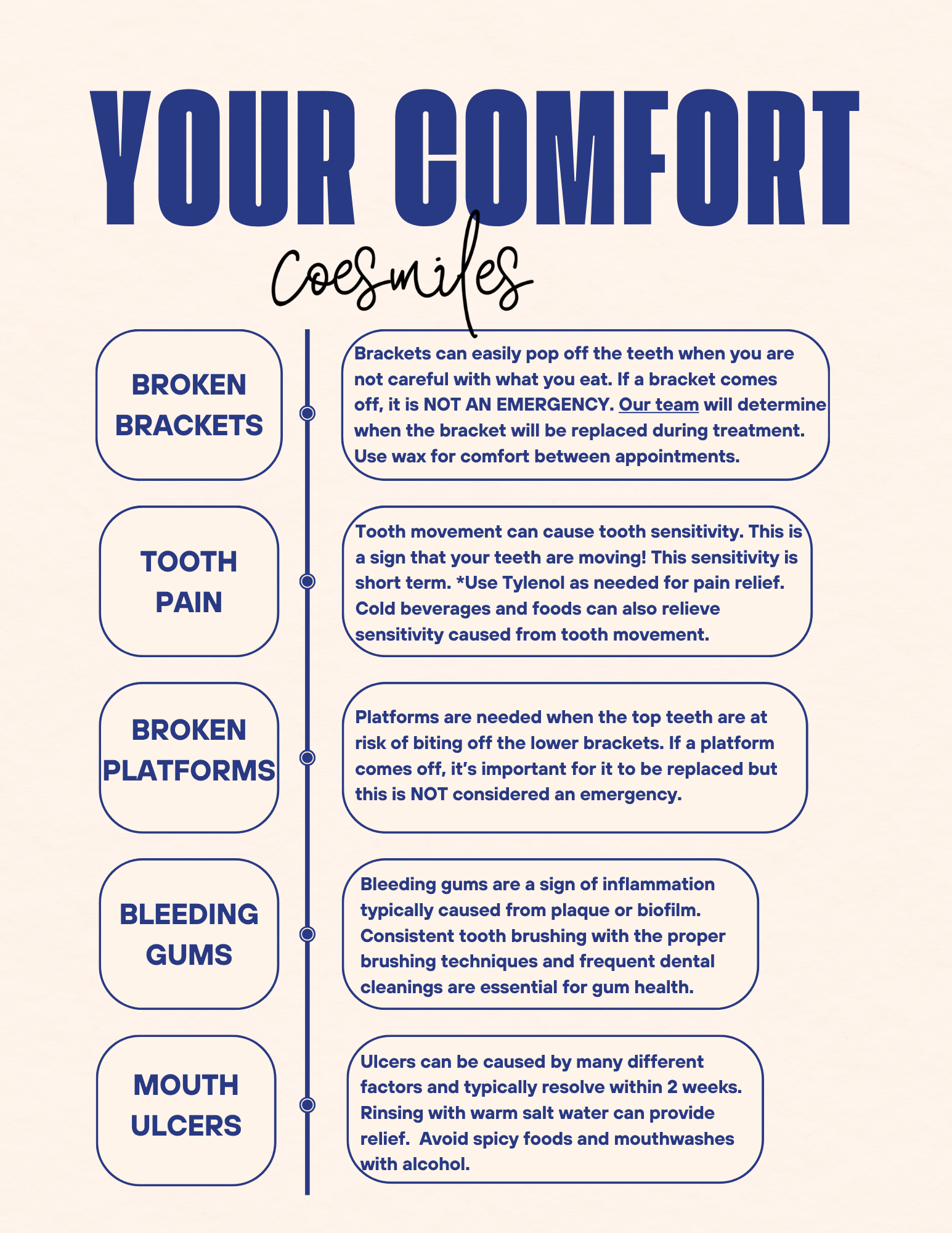
Comfort Help
Most surprises are simply unfamiliarity — and nearly all of them can comfortably wait for office hours. Here's how to feel better tonight.
Mon 9:30–5 · Tue 10:30–7 · Wed 9:30–5 · Fri 9:30–4
Finances
A soft estimate to keep your plan clear. Your financial contract from COE holds the agreed-upon numbers — upload it under My Documents anytime, or use this as a gentle guide.
Add your COE fee estimate or payment contract — a photo or a file — and the app pulls the figures straight into your estimate. You choose whether to keep the document in My Documents or delete it once the numbers are read. Insurance papers and bank details are never read.
My Documents
Photograph your COE treatment plan and the app tailors itself to your exact journey. We read only the treatment details — type, steps, and timing — never names or dollar amounts. The photo is saved to your shelf under a name you choose.
For treatment-plan scans, feel free to crop out personal identifiers (names, birthdates, ID numbers) — the scanner is built to ignore them, and keeping the treatment details visible is all your timeline needs. By adding a document, you confirm you've reviewed it and understand that anything you choose to share is disclosed voluntarily. Your COE team's direct guidance always supersedes anything in this app.
My document shelf
Keep insurance and payment papers here for easy reference. These are stored safely in your own locked shelf and shown back to you only — the app never reads them.
Shelf documents are encrypted in your own private space, visible only to the people sharing this journey. Treatment plans added from the Timeline or the scanner above land here too — a treatment-plan photo is the only thing the app ever reads.
Consent & Legal
Privacy & Consents
Only what your features need: your email, each child's first name, appliance choices, start date and estimate, the habit days you log, the visits you save, any treatment plan you choose to scan, the estimate figures you enter or read from a fee or payment contract (saved with the journey), and the documents you choose to keep on your shelf. Sharing happens only when YOU create a one-time sharing code and hand it to someone you trust — we never share a journey on our own, and you can stop sharing anytime. Your COE office never sends us your records, and we never write into theirs.
Each choice below is separate and yours. Turning one off is as easy as turning it on — and never affects the features you already use.
Optional two-factor sign-in: your password plus a 6-digit code from a free authenticator app. Entirely your choice — on or off anytime.
We do not sell your health data — ever. There is no switch in this app that can turn this on: any change would require a separate written authorization signed by you, and our practice is simply that we don't.
Access, correct, delete, export, and appeal — always available:
We answer every request within the time your state's law allows (generally 45 days), and if we ever decline one, we'll explain why and how to appeal. Reach us anytime: support@visionoptimized.com
Ask COE — AI Agent
Ask COE is an AI agent that answers only from our printed sheets and teachings — your COE team's word always comes first. For anything personal or beyond these pages, we're one call away: (609) 799-4628.
User Guide
To share: Profile → "Share this journey" → choose Others can edit or View only → tap "Create a sharing code" → send them the 8-character code by text or phone.
To join: they sign in to their own COE Smiles account (new families join first with the invitation code from our office), open Profile → "Have a sharing code?", enter the code, and the journey appears in the menu at the top of their screen.
Whatever anyone adds — a habit log, a visit, a scanned plan — everyone sharing the journey sees it. Codes work once and rest after 14 days; the journey's owner can switch between edit and view-only, or stop sharing, anytime.
Invitation Code
Family members so far: —
What this does: new patients must enter this code once, when they create their account. Changing it means the old code no longer works for NEW signups — everyone already registered keeps full access with their own email and password. After changing it, share the new code with the front desk and update any office signage.
Profile
Dr. Shalin R. Shah, DMD, MS
61 Princeton Hightstown Rd, Ste 1
Princeton Junction, NJ 08550
www.coesmiles.com
Smile stories, tips, and behind-the-scenes joy — come say hi!
Optional two-factor sign-in: your password plus a 6-digit code from a free authenticator app. Entirely your choice — on or off anytime.
Choose a new password
You followed a reset link — pick a fresh password and you're home.